Blogger Navbar is a navigation bar that defaultly appears at the top of every Blogger blog page. It has features allows you to follow, share, and report blogs. Also you can search blogs randomly from its bar.
If you think that Blogger Navbar is annoying your blog look, you can remove it easily by following method in this post.
The removal of Blogger Navbar is allowed by Blogger Team as long as your blog domain is hosted by Blogger, it means you have your domain as example.blogspot.com. If you want to remove Blogger navbar and you have your own domain hosted outside of Blogger like example.com or anything not from Blog*Spot domain, we recommend you to put "Powered by Blogger" text or logo at any section of your blog page, the logo option to put is available when you choose widget at the Page Element section.
And here is how you do remove the Blogger Navbar.
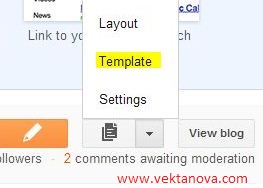 |
| Edit template menu in new interface. |
For old navigation interface, go to Blogger Dashboard, then click 'Design' and switch the tab to Edit HTML, do not forget to backup your template first by click 'Download Full Template' link which is located at the same page, then after that, click Edit HTML.
For new navigation interface, go to Blogger Dashboard and click menu tree between pencil button and 'View Blog' link like shown in the picture, click Template and click Backup/Restore button at the top-right corner of the page to download your full template. Once you have completed the download, click on Edit HTML
Check the 'Expand Widget Templates' box and using your browser search function (usually press CTRL + F), find
closing </b:skin> tag and replace it with following code:
/* Blogger Navigation Bar - http://www.vektanova.com */
#navbar-iframe {
display: none !important;
}
</b:skin>
Click preview to make sure that the navbar is removed, click Save Template if it does.
 Title
Title :
Remove Blogger Navbar (Navigation Bar)
Description : Blogger Navbar is a navigation bar that defaultly appears at the top of every Blogger blog page. It has features allows you to follow, shar...
Rating :
5


